Sound Lab
A free sound wave simulation that uses the microphone. Students see their own voice as a live wave, learn amplitude and frequency, hit 15 frequency targets in hertz, and find their vocal range.
What students do
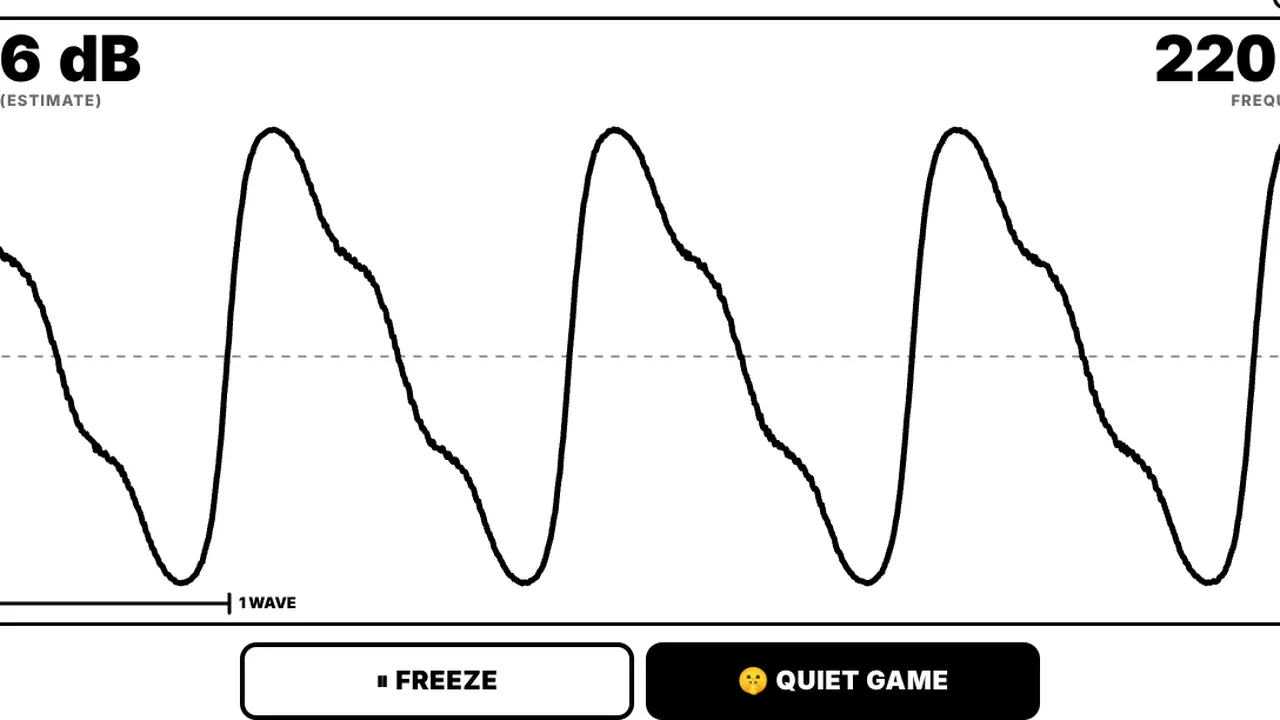
Students take a device outside, spread out, and turn on the microphone. A live line on the screen shows the sound wave of whatever the microphone hears. In Lab Mode they first stay silent, then make a loud sound, and watch the wave grow taller. That is amplitude, measured in decibels. Then they slide their voice from low to high and watch the waves squeeze together. That is frequency, measured in hertz.
Next comes the challenge: 15 frequency targets from 200 Hz to 440 Hz (partners take turns, 7 targets each). A meter tells the student to go higher or lower, and each target has to be held for 3 seconds. The targets sit where almost every voice overlaps, so they are reachable for everyone. Then the range finder records the lowest note and the highest note the student can hold steady for 2 seconds (it measures from about 45 Hz to 3,200 Hz). Students answer three reflection questions and screenshot a lab report that compares their range to typical voice ranges.
Explore Mode is a free-play wave screen that shows amplitude and frequency live, made for a projector demo. It includes the Quiet Game: the class has to stay quiet, and if the room gets louder than the trigger level an eyeless alien called the Hush, which hunts by sound, breaks the glass. A live decibel meter shows how loud the room is.
Hearing Test is a tone generator. Type any frequency from 10 Hz to 30,000 Hz (most devices can play up to about 21,000 to 24,000 Hz), or tap an age preset: 8,000 Hz (anyone), 12,000 (under 50), 15,000 (under 40), 16,000 (under 30), 17,000 (under 24) and 19,000 Hz (under 20). A whole-class sweep slowly climbs from 8,000 to 20,000 Hz so students can find the highest pitch they can hear.
Quiet test, loud test. Students see that a louder sound makes a taller wave and a bigger decibel number.
Hit 15 targets in hertz with your voice and hold each one for 3 seconds. Then a quick wave check: pick the wave with high or low amplitude and frequency.
Hold your lowest note, then your highest. See your range in hertz, notes, and octaves.
Three written questions and a one-screen lab report to screenshot.
The science behind Sound Lab
Amplitude
Amplitude is how tall a wave is. A sound wave with a bigger amplitude carries more energy and sounds louder.
The wave on the screen is the real signal from the microphone, drawn at a fixed scale, so a louder sound always draws a taller wave. Loudness is reported in decibels (dB). The decibel number is an estimate because phones and tablets are not calibrated sound meters, and the lab tells students that.
Frequency
Frequency is how many waves pass each second. It is measured in hertz (Hz). A higher frequency sounds like a higher pitch.
The screen always shows 20 milliseconds of sound. At 200 Hz that is 4 waves, and at 400 Hz it is 8 waves, so students can see the waves squeeze together as their pitch rises. A bracket marks the length of one wave. The frequency reading comes from measuring how often the wave repeats, and for a steady voice it is usually accurate within 1 or 2 Hz.
Vocal range
Right after the range finder, a "See how this compares" screen shows how many of the 88 piano keys the student's voice covers, where everyday talking voices sit, and how their range in octaves compares with untrained and trained singers and famous singers like Whitney Houston, Ariana Grande and Mariah Carey. The lab report shows the student's lowest and highest notes in hertz, as note names, and as a number of octaves (each octave doubles the frequency). A chart compares the range to the usual ranges of the six voice types, bass through soprano. The report is clear that range is the easy part: controlling your voice and sounding good on every note takes singers years of practice.
NGSS alignment
Sound Lab supports the middle school waves standards.
| Standard | What it says | How the simulation supports it |
|---|---|---|
| MS-PS4-1 | Use mathematical representations to describe a simple model for waves that includes how the amplitude of a wave is related to the energy in a wave. | Students measure a quiet and a loud sound, see the amplitude change on a live wave model, and describe the pattern in writing. |
| DCI PS4.A | A simple wave has a repeating pattern with a specific wavelength, frequency, and amplitude. | The live display shows the repeating pattern of the student's own voice, with amplitude and one wave marked on screen and frequency reported in hertz. |
| Practices | Developing and Using Models; Analyzing and Interpreting Data | Students use the wave display as a model of sound, collect their own data, and explain it in three reflection questions. |
| Crosscutting concept | Patterns | Louder means taller waves. Higher pitch means more waves each second. Doubling the frequency raises the note by one octave. |
How to use it in class
- Check the microphone (before class). Open Sound Lab on one student device and make sure the microphone is allowed. Some school devices block it.
- Hook (3 min). Put Explore Mode on the projector. Talk, whistle, clap, and let students see the wave change.
- Spread out (2 min). Go outside or anywhere students can stand a few steps apart. Nearby voices confuse the frequency reading.
- Lab Mode (15 to 20 min). Amplitude, the 15 frequency targets (7 per partner in teams), and the range finder. A skip button appears on any target a student cannot reach after 30 seconds.
- Reflect and submit (5 min). Students answer three questions and screenshot the lab report.
- Partners (optional). Pick Team on the start screen and type the first and last name of up to 3 students. Partners take turns on the frequency targets, each finds their own vocal range, and one lab report lists every name with each partner's results.
- Quiet Game (any time). Pick Quiet Game on the start screen and put it on the projector. Round 1: everyone stays silent in their seats as long as they can. Round 2: everyone walks around the room without setting it off (use Chill or Very Chill). Then talk about which actions made the biggest vibrations.
Discussion questions
- What changed about the wave when you got louder? What stayed the same?
- What changed about the wave when your pitch went up?
- Can a sound be loud and low at the same time? Quiet and high? Give an example of each.
- 440 Hz is one octave above 220 Hz. What frequency is one octave above 440 Hz?
- Why do you think the lowest note and the highest note are different for different people?
Key vocabulary
Sound wave, amplitude, decibel (dB), frequency, hertz (Hz), pitch, octave, vocal range.
Frequently asked questions
Is Sound Lab free?
Yes. It runs free in any web browser with no ads, no download, and no login.
Does it work on iPads and phones?
Yes. It works in Safari and Chrome on iPads, iPhones, Android phones, and Chromebooks. The device needs a microphone, and the student taps Allow once.
Is anything recorded?
No. The sound is measured on the device to draw the wave and is never recorded, saved, or sent anywhere. Only the student's name, results, and typed answers are saved, and only on that device.
What do students turn in?
A screenshot of their lab report. It shows their name, the date, an ID, their quiet and loud decibel readings, 5 of their notes with frequency and wavelength (two bar graphs), their vocal range compared with other singers, and their three reflection answers. Print the free one-page paper lab report so students can copy their results and shade in the graphs.
Why is it black and white?
Sound Lab is designed to be used outside, where students can spread out. Black and white with big type is the easiest thing to read in bright sunlight. A button flips it to white on black for projectors.
Are the decibel numbers accurate?
They are estimates, and the lab says so. Phones and tablets are not calibrated sound meters. The frequency readings in hertz are accurate, usually within 1 or 2 Hz for a steady voice.
How does the Quiet Game decide what is too loud?
Before the game starts, the teacher sets the trigger level (50 dB to start, adjustable with + and −). Each strictness level adds 5 dB: Silent 50, Strict 55, Normal 60, Chill 65 and Very Chill 70. A live decibel meter shows the room's loudness and the line, and you can turn the monster or its sound off.